Simulate Tattoos: Test Styles Before Doing
Announcements
Have you ever stopped to think about how many tattoo decisions go wrong for lack of prior viewing? Simulating a tattoo before going to the studio is a smart strategy that saves money, time and regret.In this guide, you will learn how to test any tattoo style virtually and make the best decision before the needle touches your skin.
Announcements
Modern technology has transformed the way people plan their tattoos.What was once just sketches on paper can now be visualized on your body in a realistic way, with specific colors, proportions and styles.You no longer need to rely only on the intuition or description of an artist to know if that drawing really works with your personal anatomy and aesthetics.
Why simulate tattoos before you do
When you simulate a tattoo, you can evaluate aspects that are impossible to perceive just by looking at a static image. The size of the drawing in relation to your body, the way the ink behaves at different angles, and the compatibility of the style with its physical characteristics are absolutely clear. Many people find out during the simulation that they prefer a slightly different version of the original design.
Research shows that a large portion of people who regret tattoos have not properly tested the design beforehand.By viewing the tattoo on your body for a few days or even weeks, you can develop certainty about the decision rather than acting on impulse. This psychological process is critical to ensure that you really want that permanent design on your skin.
Different methods to simulate tattoos
There are several practical approaches to simulate a tattoo, from completely free methods to more sophisticated tools. You can start with the simplest and evolve to the most realistic as your need. Each method offers different advantages depending on the type of tattoo you are considering and the level of detail you want to visualize.
The most basic form of simulation is to use a mirror and draw the design on your body with a pencil, pen or temporary marker. Although rudimentary, this method works surprisingly well to get a general idea of size and positioning. You can assess whether the drawing looks good in that region of the body, combines with its natural proportions, and whether the size is suitable. For simple designs or for quick viewing, this technique is free and affordable.
Augmented reality applications for simulation
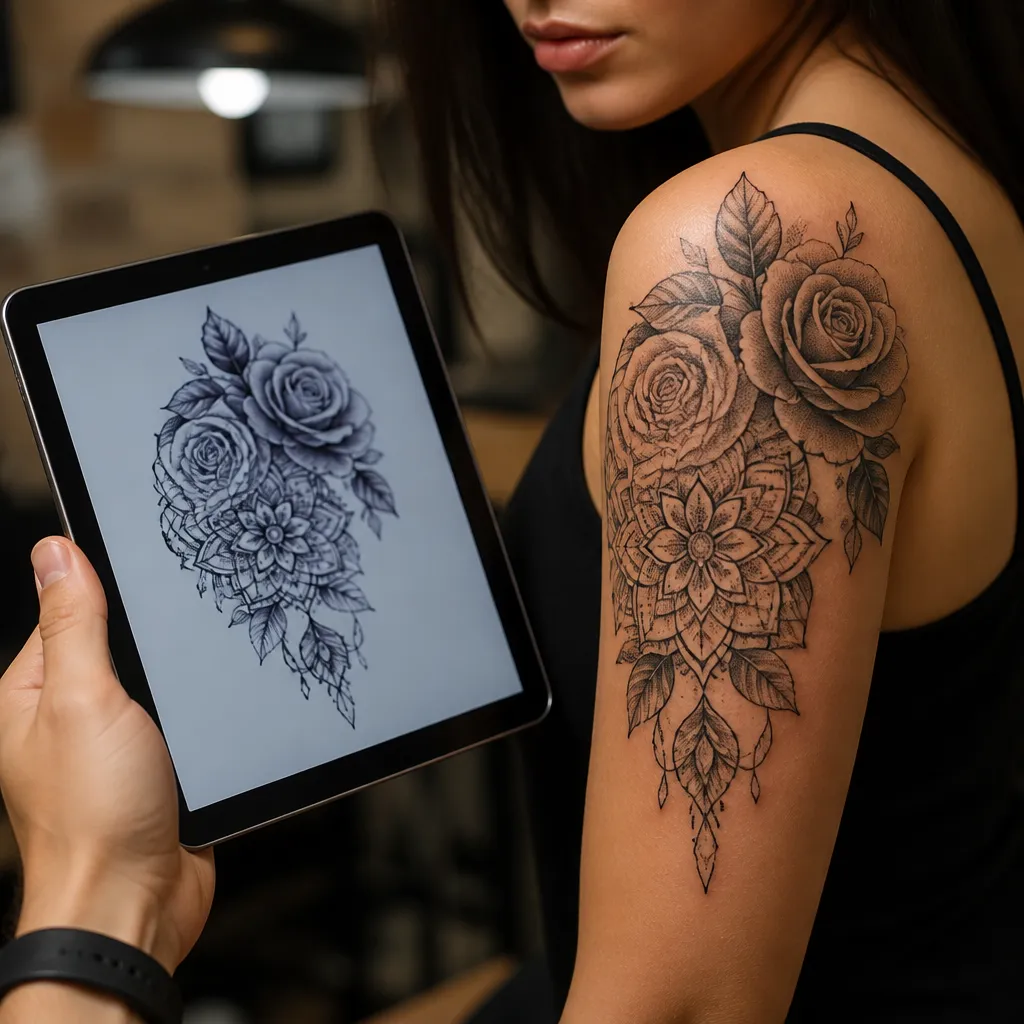
The specialized apps in tattoo simulation use augmented reality to create a much more realistic experience. These tools allow you to choose the design, body location, size, color and style, viewing everything in real time through your mobile phone’s camera.The result is practically indistinguishable from how the real tattoo would look, with shadows and correct perspectives.
You can test the design on different parts of the body in a matter of seconds. If you are undecided between a tattoo on the wrist, forearm or shoulder, these apps allow you to compare all options side by side. Many of them also offer the option of sharing the simulation with friends or with your tattoo artist to receive feedback before confirming the session. This collaborative interaction often results in better and more well-thought-out designs.
Online tools and design programs
Web platforms specialized in tattoo design work without the need for an installed application. You access through the browser, upload a design or choose from available templates, adjust colors, sizes and styles, and view everything in representations of the human body. These tools are accessible on any device with internet, making them practical for those who prefer not to install applications.
More robust graphic design programs, such as Photoshop or free alternatives, allow even more personalized simulations. You can work with professional precision, adjusting every detail of the design and positioning it exactly where you want in the body image. This method requires more technical skill, but offers full control over the final result and is ideal for complex or very customized tattoos.
Physical simulation with stickers and henna
For a visualization that goes beyond the screen, you can use temporary tattoo stickers of the design you want to make. These stickers produce a realistic representation of the tattoo and last for days on the skin, allowing you to live with the image for a while before making the final decision.You can see how the tattoo interacts with your outfit, how it looks when you move, and how you feel looking at it every day.
Henna is another excellent option, especially if your design has elements of organic or geometric patterns.Henna creates a brand that looks like tattoo ink, lasts about two weeks, and offers a close to real experience. Many henna artists manage to replicate more complex designs with high accuracy.This approach also allows you to feel the feeling of having that design on the skin for an extended period, helping you to familiarize yourself with the idea before making the permanent investment.
Testing different styles of tattoo
Different tattoo styles react differently to the body and time. A realistic style may seem impactful when new, but how does it age? A minimalist retains elegance for longer? Simulating different styles of the same design (realistic, watercolor, single line, geometric) helps you understand which one best suits your taste and your expectations of aesthetic longevity.
You can also evaluate how each style behaves in the specific location of the chosen body. A delicate design can visually disappear in an area with a lot of movement, while a bold style with strong lines remains legible and impactful.The simulation reveals these nuances that are not obvious when you are just looking at a drawing on paper or canvas. This practical knowledge is invalid to make a well-founded decision.
Important considerations in simulation
When simulating a tattoo, consider the contrast with your skin color.Very delicate designs can turn invisible if you have dark skin, while very dark tattoos can look too heavy on light skins.A good simulation should consider these natural variations and show how the specific design works with your individual characteristics.If you use a tool that allows you to adjust the skin color in the simulation, always choose the option that corresponds to your own skin.
Take into account also how the tattoo will age. Very thin lines can get blurred over time, vibrant colors can fade, and very complex designs can lose definition. Simulate how the design would look a few years later, if possible, helps you make a long-term decision. Talk to your tattoo artist about the necessary maintenance and ask if the chosen design supports well the natural aging process of a tattoo.
The proportion and positioning are critical. A tattoo you saw in a magazine or on a friend may look completely different on you depending on your body proportions and your physical type. Simulate on your real body, not on a generic body. Use tools that allow you to adjust not only the size, but also the position along the chosen limb or area to find the perfect spot.
Communicating the simulation with your tattoo artist
Once you have done a good simulation, take the image to your consultation with the tattoo artist. Share the simulation and explain your decision process. Experienced tattoo artists appreciate clients who arrive well prepared and with a clear vision. They can offer suggestions on how to improve the simulation or alert you about practical challenges that the image may not reveal. This collaboration between you and the professional results in better end results.
Ask the tattoo artist to create a final drawing based on your simulation. This professional sketch can reveal details that the digital simulation has not fully captured, such as how the lines interact with the curvature of your body or how the proportions work with the specific trait of the artist. You can still request adjustments at this point, ensuring that the final result will be exactly what you imagined during the simulation process.