Tape on Mobile: Measure Accurately
Announcements
Have you ever found yourself in a situation where you needed to measure something urgently and didn’t have a tape measure on hand? The solution is on your mobile. Measurement apps have transformed the way you perform everyday tasks, from renovations to furniture purchases.
Announcements
Virtual tape measure apps utilize augmented reality and camera technology to convert your smartphone into an accurate measurement tool. You point the device at the object, follow the on-screen instructions, and get the dimensions in seconds.This practicality has revolutionized the utility app market by offering convenience without the need to load physical equipment.
How Camera Measurement Apps Work
Modern tape measure applications use your mobile phone’s camera as the main sensor. The system detects reference points in the image and calculates distances based on computer vision algorithms.You point to the beginning of the object, mark a point, then point to the end and mark another point. The application calculates the distance between the two points and displays the result on the screen.
Augmented reality technology amplifies this functionality by overlaying lines, markings, and digital measurements over the image captured by the camera. Some applications allow you to see the measurement in real time while moving the device, creating an interactive visualization of space.
The accuracy varies according to the technology used and the distance from the object. Applications that use the LiDAR sensor, present in newer models of smartphones, achieve greater accuracy. However, most apps offer acceptable margin of error for home and basic professional use, usually between 1% and 5% depending on the lighting conditions and stability of the device.
Top Apps Available in the Market
You can find several options in the Google Play Store and the App Store, each with specific features. Measure, developed by Google, is one of the most popular alternatives.It offers a clean interface, solid basic functionalities and integration with the Google ecosystem, allowing you to save measurement histories in your account. The application works with augmented reality and is free, making it accessible to any user.
Tape Measure is another widely used option, especially among professionals who perform frequent measurements.It offers advanced features such as automatic area calculation, conversion of units of measurement and detailed history of previous measurements.The free version provides access to essential features, while premium versions unlock additional features such as data export and custom reports.
The iHandy Level is aimed at users who need more accurate measurements and leveling verification. In addition to measuring distances, this application checks whether surfaces are perfectly horizontal or vertical. Professionals in renovation, construction and decoration find in it a reliable tool to ensure that furniture and structures are aligned correctly.
ARCore Measure, specific for Android devices with ARCore support, delivers superior accuracy through integration with advanced phone sensors.You can measure entire spaces, not just isolated objects, making it easier to plan renovations or reorganize environments.Environment mapping technology makes measurements more reliable indoors.
Comparative: Which App to Choose
The choice depends on your purpose of use and the type of mobile you have. If you seek simplicity and integration with Google services, Measure is your best option. The application takes up little storage space, does not require complex configurations and offers quick results for simple measurements of everyday life. Ideal for those who need to measure occasionally, such as when buying furniture or checking if something fits in a space.
For professional or frequent use, Tape Measure offers more functionality and control. You record each measurement, add notes, capture photos of the measured objects and create organized histories. The ability to export data and share reports with clients or colleagues makes this application more versatile for professionals who need to document their work. The investment in a premium version is justified if you perform many measurements regularly.
Whether your job involves professional construction, refurbishment or decoration, iHandy Level completes your mobile phone’s measurement toolbox. The level functionality helps ensure final visual quality, while measurements provide the required dimensions.The combination of both features prevents you from having to load multiple physical tools to work.
IPhone users with newer models, who have LiDAR sensor, should prioritize Google Measure or ARCore Measure to take advantage of this advanced technology.The sensor offers superior accuracy to camera-only algorithms, reducing measurement error for professional situations where accuracy is critical. You achieve results comparable to physical tape measures in many situations.
Advantages of Using Digital Tape on Mobile
Convenience is the biggest benefit.You charge your mobile phone in any way, making it unnecessary to keep a physical tape measure at home, car or purse. There is no worry about loss, damage or forgetfulness of the equipment. Whenever you need to measure something, the application is there, ready to use. This accessibility encourages you to check dimensions before making purchase or decoration decisions.
The speed of obtaining results has surpassed traditional tape measures in many scenarios. You do not need to stretch any tape, look for small numbers or write down measurements on papers that can be lost. The results appear instantly on the screen, with the option to save, share or convert to different units of measurement in seconds. Professionals who perform multiple measurements gain significant time.
The automated digital record prevents manual annotation errors. When you measure with application, the measurement is recorded on the device with date and time, and may include photos of the object or space measured. This history facilitates later comparisons, project documentation and communication with third parties. You recover any old measurement by consulting the history of the application, without relying on notebooks or loose photographs.
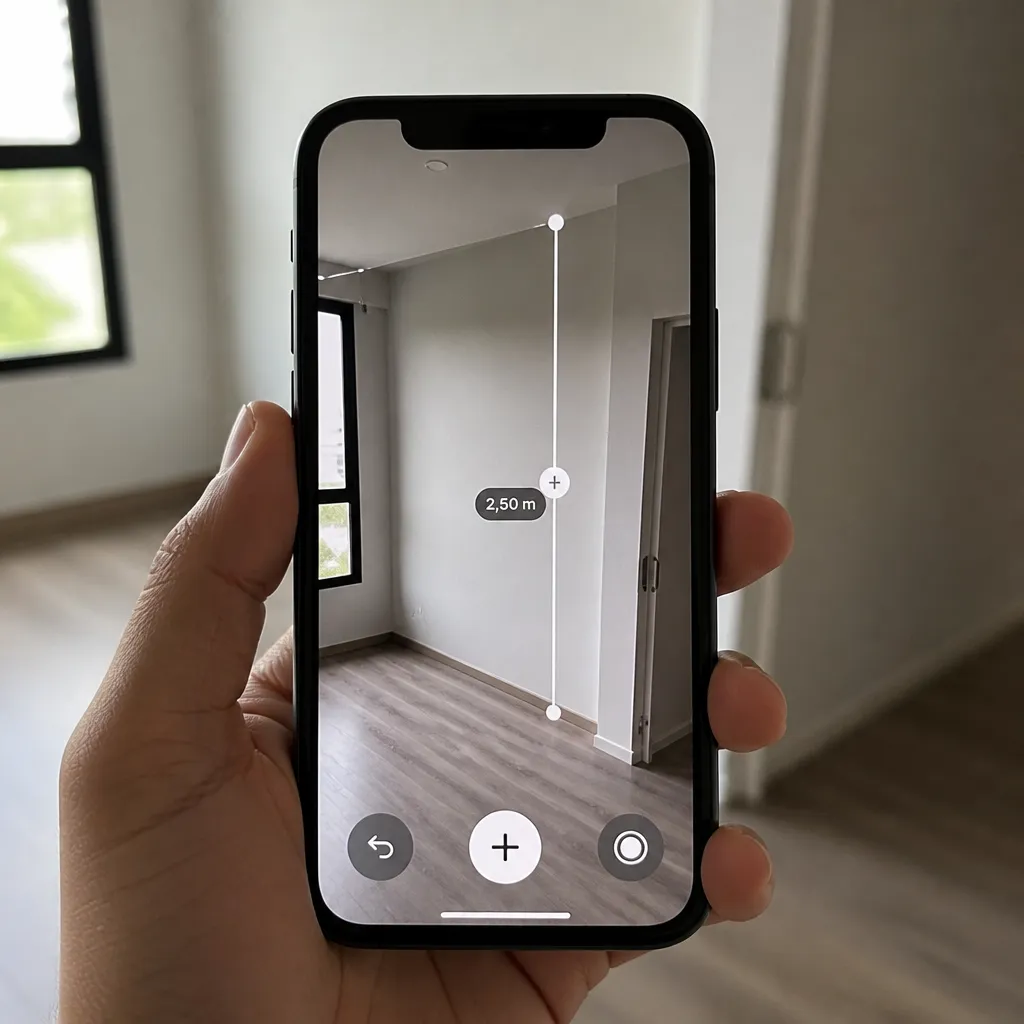
Augmented reality visualization helps you understand space better.When you see the measurement superimposed on the real image, it captures proportions and perspectives that numbers just can’t convey. This visual understanding facilitates decisions about furniture layout, curtain sizing or fitting objects to the available space.
Limitations and Care when Using Measurement Apps
Accuracy is not absolute, especially at greater distances.Percentage error increases as you move away from the object, making whole-wall measurements less reliable than measurements of nearby objects.For projects where accuracy is critical, such as custom furniture or building materials in defined quantity, combine the application with physical confirmation measurements.
Lighting conditions significantly affect application performance. Very dark environments impair image capture, while direct sunlight at certain angles can create reflections that confuse the algorithm.Seek to measure in environments with diffuse natural lighting or consistent artificial light. Avoid shadows on the object you are measuring, as they interfere with the detection of edges and landmarks.
You need to have stability when using the device. Sudden movements, shaking hands or lack of support compromise the quality of the measurement. Support the phone in something fixed when possible, or hold it with both hands firmly. Some users report better accuracy when using the mobile in an upright position, as the camera provides more direct angle for capturing distances.
Not all smartphones run measurement applications with equal competence.Very old devices with low resolution cameras or slow processors may fail to correctly identify distances.Middle to top models of recognized brands offer better performance.Before relying completely on an application, test it on measurements you already know by comparing the results with the physical tape measure.
Practical Use Cases for Measurement with Cell Phone
Furniture and appliance purchases are perfect for this type of measurement. You measure the available space before going to the store, document the dimensions and query while examining products. This avoids buying items that do not fit in your space or that leave compromised circulation.Sellers also appreciate when you arrive with accurate measurements, making the process more efficient and reducing returns due to mismatch of dimensions.
Decoration and design professionals use digital tape measure for quick prospecting. Before proposing budget or solution, you photograph and measure environments using only the mobile phone.This data is shared with design team, saving travel or need to annotate everything manually.The visual documentation with overlapping measurements communicates the current situation clearly to those who have not been on site.
Renovation and construction work benefit from cell phone measurement as a complementary tool. You check element alignment with level functionality, measure openings for doors and windows, and document changes during the process. The superimposed measurement photo serves as a before and after record, helping in communicating with the customer about changes made.
Transportation and logistics use mobile measurement to check if items fit in vehicles or storage spaces. Drivers and managers can confirm delivery or storage without having to unload everything. This efficiency reduces uptime and prevents last-minute refusals due to inadequate space.
Online sellers who market used or second-hand items use measurement applications to accurately describe products. Adding the exact dimensions along with photos increases buyer confidence and reduces returns for dissatisfaction.You provide objective information that facilitates customer purchase decision, improving satisfaction of both parties.
Tips to Maximize Measurement Accuracy
Keep your phone camera clean before measuring. Dirt, dust or fingerprints on the lens reduce image sharpness, harming the detection algorithm.Pass a soft, dry cloth on the camera, especially if the device has been in the bag or pocket. This simple cleaning significantly improves the quality of the captured measurements.
Use visual markers to improve accuracy over longer distances. If you are measuring an entire wall, position objects of known size at the ends. The application uses these reference points to calibrate the measurement, increasing reliability of the results.
Perform multiple measurements of the same object and compare the results. Small variations are normal, but if you find large discrepancies, redo the measurement by adjusting positioning, angle or illumination. Averaging the results obtained to reach a more reliable measurement. This methodology works particularly well in professional or critical measurements.
Test the app regularly by comparing with known physical measurements.Measure objects you already know the exact size and check if the app provides close result. This calibrates your confidence in the app and helps you understand your device-specific error pattern. Apps can be more or less accurate depending on the phone, so knowing your own pattern is important.
Export and save important measurement records.Do not rely only on memory or application history. For professional projects, save data in a format that persists, such as PDF or annotated image. This ensures that you have proof of measurements if you need to reference them later or resolve questions with customer or supplier.