turn your phone into a sound box
Announcements
Turning your phone into a sound box is a practical and economical solution to amplify audio without investing in expensive equipment.With the right techniques and tools, you can significantly improve the sound quality of your mobile devices.
Announcements
Many people make mistakes when trying to use the phone as a sound box, compromising both the audio quality and the durability of the device. In this article, you will learn the best practices and the most common mistakes to avoid to enhance the sound performance of your smartphone safely and efficiently.
Understand the Audio Potential of Your Mobile Phone
Every phone has an integrated sound system, but most users never exploit its true potential. The internal speakers of modern smartphones have an underestimated power, capable of producing a reasonable volume when optimized correctly.
Before turning your phone into a speaker, it is essential to understand the technical limitations of the device. Most smartphones have medium quality mono or stereo speakers, designed for calls and casual media consumption. When you amplify the audio signal intentionally, you can turn this device into a much more powerful sound player for your environments.
Common Error: Increasing Volume to Maximum Without Control
One of the most frequent misconceptions is simply to increase the volume of the cell phone to the maximum and expect a good sound experience. This does not work like this and can damage the speakers permanently. When you force the audio to the maximum continuous, it causes distortion of the sound and wears out the internal components in a short time.
Maximum volume does not mean better sound quality. In fact, working with moderate volume levels, between 70% and 85%, offers better audio clarity and greater durability of components. You protect the device and maintain consistent sound quality for longer, a practice that few users adopt.
Optimize Your Device Audio Settings
Most phones offer equalizer settings that you can adjust manually. Access the sound options in your smartphone settings and look for equaliz ador, bass amplifier or audio enhancer.
You should also disable security volume limitation when in private environments.Many handsets have automatic limiters that reduce the maximum volume to protect the user’s hearing.By consciously disabling it (not on headphones), you regain more sound capacity from your device for use as a makeshift speaker.
Common Error: Ignoring Environmental Acoustics
Turning your phone into a sound box goes far beyond increasing settings. The environment where you use it dramatically influences the perceived quality of the audio.Many users place the device on soft surfaces such as beds or sofas, which absorb sound and significantly reduce the effective volume.
To improve the sound propagation, position your mobile phone on hard surfaces such as wooden or glass tables. These surfaces reflect sound waves and create a natural amplification without additional technology.You will notice an impressive difference just by changing the position and location where the phone is during audio playback.
Use Home Acoustic Amplifiers
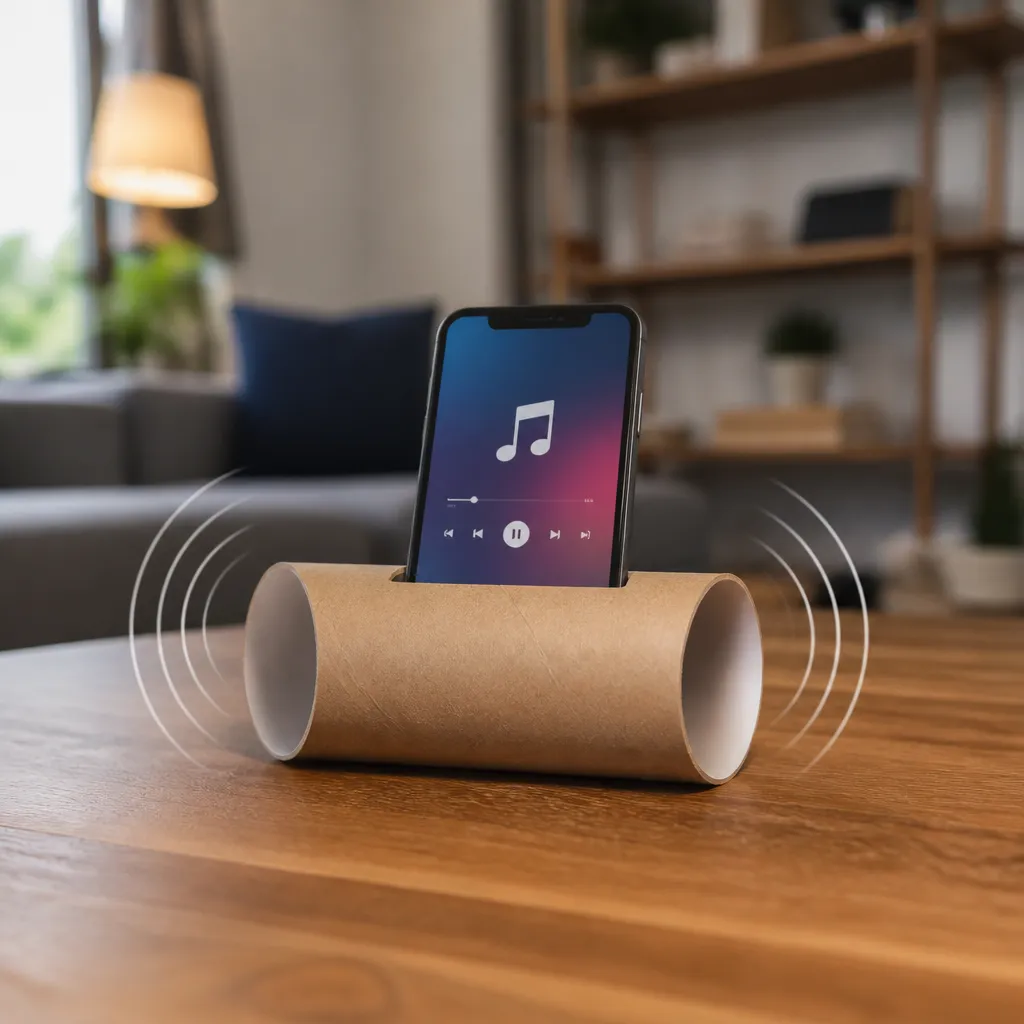
You don’t have to spend money on fancy equipment to amplify your phone’s sound.Home acoustic amplifiers work surprisingly well and are created with simple materials you probably own at home. A ceramic cup or cup placed behind the phone’s speaker creates a resonance chamber that amplifies audio naturally.
Another popular technique involves placing the cell phone inside an empty container, such as a cardboard box or a large bowl. The container acts as a basic acoustic sound box, reflecting and amplifying the sound emitted.You can experiment with different materials and sizes to find the configuration that offers the best amplification for your specific case.
Common Error: Neglecting Audio Source Quality
Many people try to amplify low-quality audio files and expect professional results. Increasing the volume of a compressed song or video in reduced quality does not improve the experience, it just makes the problems more evident. The origin of the audio basically determines the quality ceiling you will be able to achieve.
For the best results, use streaming platforms that offer high quality audio or lossless files when possible. You will notice a significant improvement in the clarity and depth of sound when working with well-produced audio sources.
Amplification Applications and Sound Enhancers
There are several applications available that work as sound enhancers for smartphones. These programs use audio processing algorithms to increase volume and improve certain frequencies.Many of these applications also offer advanced equalization control that you can completely customize according to your sound preference.
When choosing an audio enhancer, prefer those with a good reputation in the app stores and who have positive reviews from real users. You should test before you completely trust, as the quality varies greatly between the available options. Some only increase the volume, while others offer deep processing that really improves the audio experience of the mobile.
Common Mistake: Using Headphones as a Sound Box
A frequent mistake is to connect headphones to the phone expecting sound magnification, when in fact headphones reduce the volume even more because they divide the audio between the drivers. Headphones are designed for direct audio delivery to the ears, not for public magnification.
If the goal is to actually turn the phone into a speaker to share audio with others, keep the internal speakers on. Turn off the headphones completely and rely only on the sound system of the device, then use the acoustic amplification techniques and software mentioned above.
Bluetooth Connections and Audio Transmission
If you want to connect the mobile phone to other equipment with better sound capacity, Bluetooth technology offers a wireless and practical solution.You can pair your smartphone with portable Bluetooth speakers that significantly amplify the audio signal.This is the most effective method when you need true amplification without technical limitations of the device.
There are Bluetooth speakers of various sizes and prices available in the market, from ultra-compact models to robust systems. When considering this option, you get flexibility and superior sound quality compared to simple acoustic methods.For those who want professional results, this is clearly the most reliable and durable route.
Common Error: Overloading Mobile Phone with Multiple Audio Apps
Installing multiple sound enhancers and amplifiers simultaneously on the phone creates conflicts between applications and reduces overall system performance. Each program that processes audio consumes processor resources, slowing the device down and causing better quality loss. You should only use a good quality amplifier, not a collection of them.
Keeping your phone unobstructed from unnecessary programs ensures that available resources are dedicated to audio processing optimally. Uninstall power-ups that you are not using and keep only the best for your specific case. This simple care significantly improves both the quality and stability of the system.
Maintaining Your Smartphone Speakers
Just like any electronic component, cellphone speakers need regular maintenance to function at their maximum potential. Dust and debris accumulate in the small holes where the sound comes out, reducing audio quality gradually. Regularly cleaning these holes with a dry cloth or a soft brush removes obstructions that compromise the sound.
You should avoid exposing the device to excessive moisture, as moisture damages the internal speakers permanently. If the phone has become wet, let it dry completely in a cool, airy place before trying to amplify the audio. These simple preventive care extend the life of sound components and ensure better audio quality for longer.